Intent Visualizer
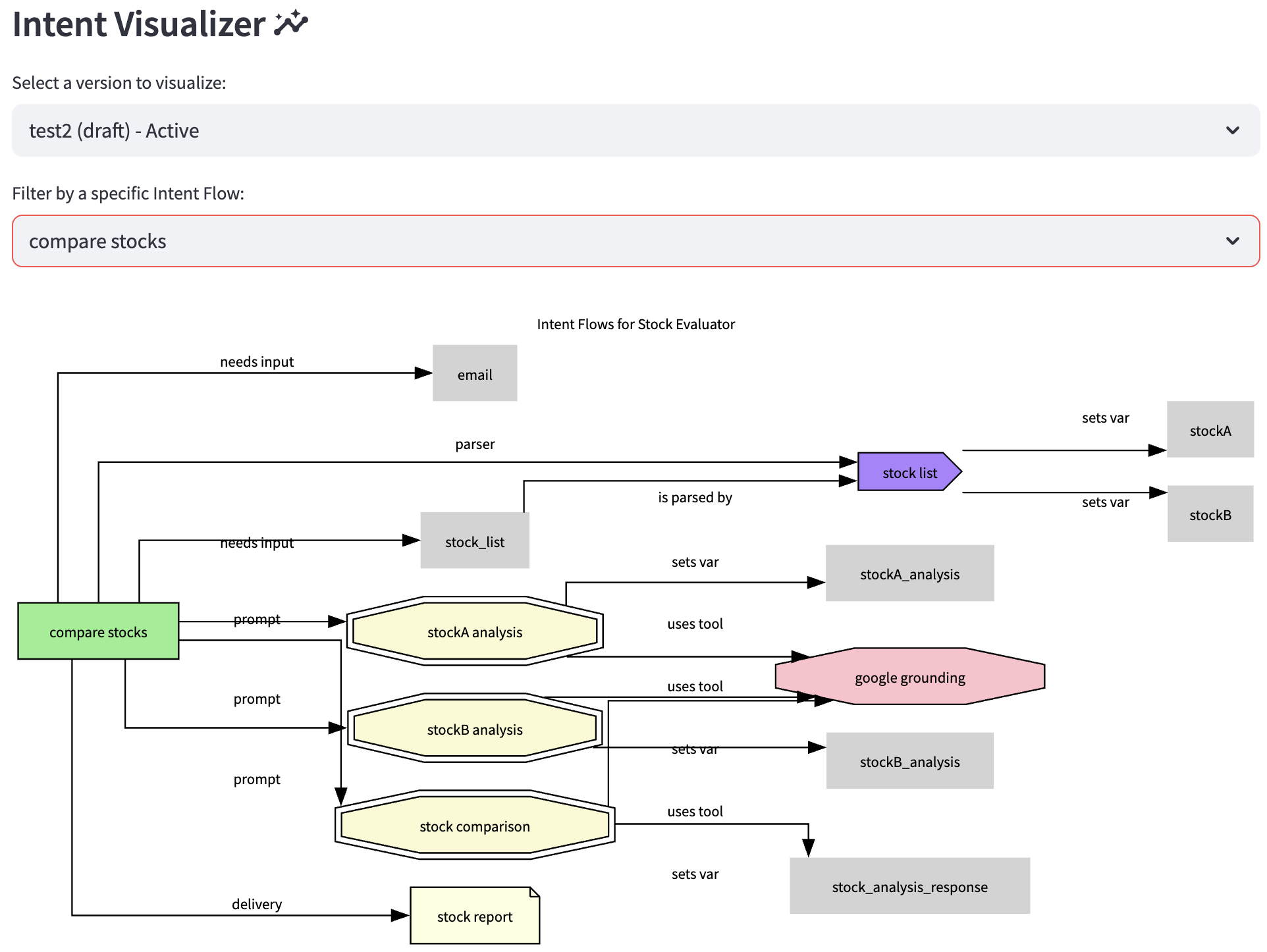
The Intent Visualizer is a powerful diagnostic tool that renders a graphical representation of your agent's configuration flow. It helps you understand the relationships and dependencies between different components like intents, prompts, APIs, and variables. This is particularly useful for debugging complex logic, onboarding new team members, and documenting your agent's architecture.
The visualization is based on a specific, saved Version of an agent, allowing you to analyze and compare different configurations over time.
Prerequisites
Before you can use the visualizer, ensure the following conditions are met:
- You must be logged into the application.
- Your user role must have the necessary permissions (
owner,admin,editor, orversions). - You must have an Account and an Agent selected from the sidebar.
- The selected agent must have at least one saved Version (created on the Versions page).
How to Use the Visualizer
The page is straightforward to use and involves two main steps.
Step 1: Select a Version
Use the first dropdown menu, "Select a version to visualize:", to choose which saved version of the agent you want to inspect. The versions are listed by name, type, and status (active/inactive).
Step 2: Select an Intent Flow
Once a version is selected, a second dropdown appears: "Filter by Intent Flow:". This allows you to control the scope of the visualization.
-
Starting Flow (Default): This view shows the agent's main entry points. It visualizes the
startPrompt(used for initial user input classification) and thedefaultIntent(the fallback intent when no other match is found) and their immediate connections. This is useful for understanding how a conversation begins. -
Specific Intent Flow: Selecting any other intent from this list will generate a graph focused exclusively on that intent's complete execution path. It will show every component that the selected intent calls, either directly or indirectly, giving you a clear picture of its entire logic from start to finish.
The graph will automatically update based on your selections.
Understanding the Graph
The generated diagram uses different shapes and colors to represent the various components of your agent's configuration. The arrows (edges) show the direction of the flow or the relationship between components, and they are often labeled to describe the nature of the interaction (e.g., "uses tool", "sets var", "needs input").
Node Legend
The visualizer has been expanded to support modern table and capability nodes, utilizing specialized flowchart shapes:
| Shape | Color | Node Type | Description |
|---|---|---|---|
| ● | Light Blue | Agent | The root agent node (only in "Starting Flow" view). |
| ■ | Light Green | Intent | Represents a user's goal or purpose. The central organizing component. |
| ■ | Cyan | Action | A reusable block of logic, often called by an intent. |
| डबल | Light Goldenrod | Prompt | A template used to query the LLM for a response or classification. |
| ⬄ | Magenta | MCP | A Model Context Protocol (MCP) tool, function, or prompt definition. |
| ⬢ | Pink | Tool | An external function or pre-built capability (e.g., Google Search). |
| ➤ | Light Coral | API | A connection to an external RESTful API. |
| ⬅ | Orange | Connector | A configuration for authenticating with external services (e.g., OAuth). |
| 🗀 | Khaki | File | A file read/write operation (GCS, S3, local storage). |
| 🗎 | Light Yellow | Delivery | A method for sending information out (e.g., email, SMS). |
| ⌂ | Tan | Script | A custom script (e.g., Python/JavaScript) to be executed. |
| cds | Medium Purple | Parser | A tool to extract data from a source variable into other variables. |
| ⬬ | Medium Purple | Merger | A tool to combine data from variables into a new output. |
| ▼ | Amber | Rule | Evaluates conditional logic to branch the context flow. |
| ⏿ | Light Cyan | Query | Runs a reusable direct SQL query against a connected database connector. |
| ⧉ | Thistle | Element | Interacts with pre-built mini-functions (e.g., password gen, encryption). |
| 🗋 | Bisque | Form | Generates an interactive form with fields and a custom TTL. |
| ⬢ | Light Sky Blue | Loop | Performs iterative loop logic over a datasource or custom steps. |
| ⬡ | Aquamarine | A2A | Bridges multi-agent communication, calling another target agent. |
| ▰ | Light Yellow-Green | Input | Prompts the user for manual input mid-flow. |
| ⬡ | Wheat | Audio | Manages streaming audio playback, VoIP, or speech-to-text. |
| ⌂ | Azure | Model | Connects to a specific LLM model version/endpoint capability. |
| Variable | Light Grey | Variable | A piece of data stored in the agent's session state. |
Enhanced Capabilities
The Intent Visualizer has been upgraded with sophisticated traversal engines to visualize complex and modern configurations:
Recursive Required Inputs Parser
Standard data inputs are no longer limited to basic key-value lists. The visualizer parses hierarchical required inputs, recursively navigating:
- Sequential Steps: Follows digit-ordered structures (
"0","1", etc.) to isolate the actual variable names. - Nested Objects: Detects custom field options like prompt messages and default values, automatically listing defaults on the variable nodes.
- Variable List Loops (Collections): Visualizes list collection objects (e.g., order item arrays) and dynamically connects them to their terminators (representing
finish_varloops) and loop properties.
The Intent Inspector
To complement the graphical DAG flow diagram, an interactive Intent Inspector Dashboard renders below the graph whenever a specific intent is selected:
Metrics & Overview
Displays key metrics at a glance:
- Type: (e.g., Action, Information, Fixed, Input).
- Status: Active or Inactive.
- Privacy Level: Acceptable, Private, or Highly Private.
- Associated Agents: Lists which specific agents are using this intent.
- Metadata: Details description text and exact contains-search-word triggers.
Inspector Tabs
- Required Inputs Structure Tab: Reconstructs the complex required variable JSON into a readable nested bulleted tree. Lists loop collections, terminator logic, prompt texts, and default values clearly without raw JSON clutter.
- Context Flow Sequence Tab: Shows the exact sequential execution list categorized by context stage (
preprocess,subprompt,subprocess,final prompt,finalprocess). - Action Settings Tab: Isolates action-specific configurations (Action Type, Language, Event, Delivery Method, custom Action Response text, and sequentially lists the underlying Action Flow).
Common Use Cases
- Debugging & Troubleshooting: Trace exactly where variable leakage or incorrect flow branching is occurring.
- Loop Flow Verification: Visually confirm that sub-fields inside loop structures are properly linked to the main array collector and terminators.
- Impact Analysis: Understand immediately how changing a database Query connector, variable scope, or prompt template impacts dependent intents.
- Onboarding & Design Documentation: Generate beautiful, interactive visual architecture sheets of any agent version instantly.